
Factory reset
Restart vs. Reset
Do you want to restart your robot or reset it to factory settings? We always recommend restarting it before deciding to reset it.
Restart:
A restart is like a simple refresh. Similar to turning the robot off and on again, a restart can help resolve common errors. A restart is always safe—no data is deleted.
Reset:
When you reset to factory settings, all data is deleted and the robot’s original settings are restored. Your robot will be removed from your account, and all personal data and settings will be lost. The language selection, cleaning settings, and time zones will be reset to their default values, and the robot will be disconnected. All saved data from your iRobot® account and all existing third-party smart speaker connections will be removed. Only perform this if other troubleshooting steps have not helped or if you want to pass the robot on to someone else.
How do I reset the device to factory settings?
The following models are controlled via the Roomba® HOME app:
- Roomba® Mini
- Roomba® 100/1000 Series
- Roomba® 200/2000 Series
- Roomba® Plus 400 Series
- Roomba® Plus 500 Series
- Roomba® Max 700 Series
All other models use the (classic) iRobot® HOME app.
Via the app (recommended):
When you reset the robot to factory settings via the iRobot® HOME app, the robot will be removed from your app, and all saved data will be disconnected from the iRobot® Cloud.
iRobot® HOME App (classic): Product Settings ➔ About (robot name) ➔ Remove Device from Account


App view
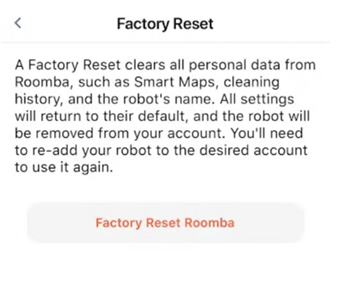
Roomba® Home App (New): In the “Robot” tab, tap the three dots in the upper-right corner to navigate to the robot settings. ➔ Select the first option, “About Roomba.” ➔ Then select the last option, “Reset to Factory Settings and Remove Robot.”


Note: It’s not possible to save your map. But don’t worry: Creating a new map with LiDAR only takes a few minutes.
Manual reset using the buttons on the robot:
You can also reset the robot manually by pressing a combination of buttons. Your cloud data, app data, and account links will remain intact if you choose this method. Scroll down to find your model and learn how it works:
- Roomba® Mini, 100/1000, 200/2000, Plus 400, Plus 500, and Max 700: Press and hold the
 Home button for 5 seconds—you’ll hear the following message: “To reset your robot to factory settings, press and hold the
  Home button and the Power button again for 5 seconds.”
- Press and hold the
 Home button and the Power button again for 5 seconds to reset to factory settings
 - Note: Keep the button pressed until you hear a prompt from the robot.
- Press and hold the
- Roomba® Essential: Press and hold the three buttons—
 HOME,
HOME,  Spot Clean, and CLEAN—for about 7 seconds until the white light ring around the CLEAN button rotates back and forth. The white light ring rotates, and 5 seconds later, the robot emits its startup sound
 - S- and i-Series robots: Press and hold the
 HOME,
HOME,  Spot Clean, and CLEAN buttons until the white light ring around the CLEAN button rotates back and forth.
 - j-Series/Combo 10 Max: Remove the dustbin and press and hold the CLEAN button for seven (7) seconds until Roomba beeps. Press the CLEAN button twice more to confirm.
- e-Series robots: Press and hold the
 HOME,
HOME,  Spot Clean, and CLEAN buttons for 20 seconds, then release them.
 - 900 Series robots: Press and hold the
 Dock,
Dock,  Spot Clean, and CLEAN buttons until all LEDs light up.
 - 600 and 800 Series robots with Wi-Fi connectivity: Press and hold the

 Dock,
Dock,  Spot Clean, and CLEAN buttons until the robot beeps, then release them.
 - Roomba® Combo: Open the control panel door and locate the recessed reset button to the left of the power switch. Press and hold the reset button for 10 seconds.
- Braava jet® m-Series robots: Press and hold the
 HOME,
HOME,  Spot Clean, and CLEAN buttons until the white light ring around the water tank lid rotates back and forth.
- Download the iRobot / Roomba® Home app (if not already installed).
- Add the robot as a new device.
- Connect it to your Wi-Fi.
- Start a mapping run (for models with mapping).
Can I save my maps?
Your custom smart room maps can be saved to your account. If an Imprint Smart Room Map has been created, you’ll have the option to save your custom smart room maps to your robot before resetting it to factory settings, once the factory reset is complete. By saving your Smart Floor Plan, the robot won’t need to re-learn and map your home, and the map won’t need to be adjusted after the factory reset is complete.
➤ To enable this, make sure the “Save maps during factory reset” option is enabled on the “Factory Reset” screen.
Note: If the robot does not have the “Imprint Smart Floor Plan” feature, it will not display an option to save a map.

Imprint Smart Map™
Applies to: all Roomba models (600 series, 680, 800 series, 900 series, e5, e6, i1, i3, i5, i6, i7, i8, s9, j-series, Combo, 105, 115, 205, Plus 405, Plus 406, 415, Plus 505, 515, 575, 675, Max 705, 875) and Braava models (300 series, Braava Jet 250, Braava Jet m-series).